The
 Buttons
Pressing any of the Maintenance buttons will display the Maintenance window:
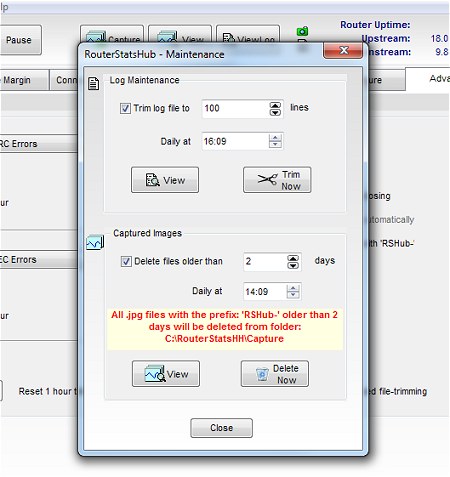
This should be reasonably self-explanatory. Pressing the Trim Now and Delete Now buttons will perform the specified actions immediately.
The deleted images are, in fact, sent to the Recycle Bin so they can be retrieved if necessary but lines deleted from the Log file are lost.
RouterStatsHub creates a Capture folder when it first runs and it's highly recommended that you use this folder exclusively for RouterStatsHub captured images.

If a maintenance schedule has been set for the Log or the Captured images, the appropriate Maintenance button will have a tick icon alongside it.

Obviously RouterStatsHub has to be Open for this maintenance to occur but it does not need to be actually running.