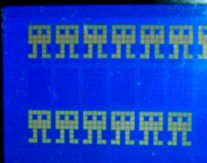
The code below shows how to program a character with PicAxe Basic (in this example, character 0x03) and display it
on the LCD.
          ;===========================================
          ;Custom characters for the ByVac 20x4 IASI-2
          ;===========================================

          ;The following is adapted from code by 'hippy' at http://www.picaxeforum.co.uk/

    SYMBOL abyte = b0
    SYMBOL nibble = b1

    hsersetup B9600_4, %10000 		;Minimum rate is 9600
    hserout 0, (13) : pause 100		;so use hserout not serout.
    hserout 0, (13) : pause 100		;Get auto-baud rate (2 x cr)
    hserout 0, ("ac1", 13) : pause 500	;and initialize LCD


    	  ;The ByVac IASI-2-LCD serial BV4108 module uses a 'terminal-friendly' syntax using
	  ;(predominantly) ASCII-printable/keyboard-accessible characters for its commands and data formats.
          ;
  	  ;As the module can support multiple devices on the same serial connection, the first byte
          ;of any command or data is the address of the device. The default address is $61 (keyboard char 'a').
    	  ;
   	  ;The second byte determines whether we are sending a command ('c') or data ('d'). So, sending the
          ;string,"adA", 13 will send the literal ASCII characters $61 $64 $41, $0d  as data 'A' to the display.
   	  ;
  	  ;Confusingly, commands are sent slightly differently. They begin with "ac" (where 'a' is the device
          ;address and 'c' means a command is to follow) but the actual command value has to be in the form of an
   	  ;ASCII hexadecimal text string.
  	  ;
    	  ;Commands typed at the keyboard or 'hard-coded' in Picaxe code (such as "acc0", 13) will work correctly
          ;but,in cases where the command value is more easily calculated on the fly and needs to be assigned to a
          ;Picaxe variable, the required ASCII text value of each HEX character needs to be calculated and sent
          ;on the fly as well.
          ;
          ;Although PICAXE BASIC has the '#' variable prefix to print the contents of a byte as if it were an
          ;ASCII decimal numeric string (instead of printing the literal ASCII character that is represented by
          ;the variable's value), it doesn't have a similar facility to print a byte as an ASCII Hex numeric string.
          ;SendCmdByte - very slightly adapted from code by 'hippy' on the Picaxe forums - does just that.


    abyte = 3 * 8 OR $40			;programmable characters start at $40. Each
    						;character occupies 8 bytes. So char 3 starts
    						;at CGRAM address 3 * 8 OR $40 (= $58)


    gosub SendCmdByte                   	;Set LCD address pointer to CGRAM address $58


  	  ;Create custom character
    abyte = %111111 : gosub SendDataByte	; #####
    abyte = %110101 : gosub SendDataByte 	; #-#-#
    abyte = %111111 : gosub SendDataByte 	; #####
    abyte = %111111 : gosub SendDataByte 	; #####
    abyte = %101010 : gosub SendDataByte 	; -#-#-
    abyte = %101010 : gosub SendDataByte 	; -#-#-
    abyte = %111011 : gosub SendDataByte 	; ##-##
    abyte = %100000 : gosub SendDataByte 	;

  						;Reset display to start of Line 1
    hserout 0,("ac80", 13)			;in normal DDRAM.

  main:
    pause 1000
    abyte = $03 + 8           			;Display User Defined Character 3.
						;Some values between 0 - 8 are used for LCD
						;system-wide commands so use the character's
						;"twin" at CGRAM position + 8

    gosub SendDataByte
    goto main

 SendDataByte:
    hserout 0,("ad", abyte, 13)
    return


 SendCmdByte:
     	  ;The following is adapted from 'hippy' at http://www.picaxeforum.co.uk/
   	  ;It converts the single character address byte ($58 in this case) into two ASCII hex text characters
   	  ;as required by the ByVac Controller. Here, it sends "ac", "5" followed by "8", 13 instead
          ;of simply sending 'X' - the ASCII representation of $58

    nibble = abyte / $10 + "0"
    if nibble > "9" then : nibble = nibble + 7 : endif

    hserout 0, ("ac", nibble)			;Send. No 'cr' yet as we still need to
						;convert and send the low nibble.
    nibble = abyte & $0F + "0"
    if nibble > "9" then : nibble = nibble + 7 : endif
    hserout 0, (nibble, 13)
    return