CO2 Monitor
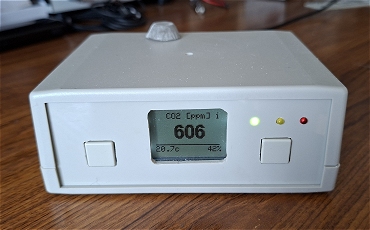
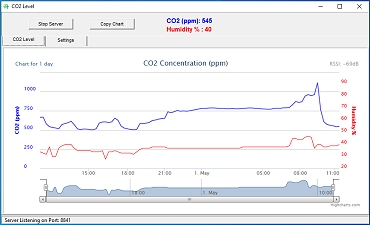
Although most of us are aware of the importance of monitoring carbon monoxide gas (CO) in our homes, a build up of carbon dioxide (CO2) can also cause harmful health effects.
This table shows the effects of increasing CO2 levels in an enclosed space.
| 400 ppm 0.04% | Normal outdoor air |
| 400 - 1,000 ppm 0.04 - 0.1% | Typical indoor CO2 levels |
| 1,000 - 2,000 ppm 0.1 - 0.2% | Complaints of drowsiness |
| 2,000 - 5,000 ppm 0,.2 - 0.5% | Headaches, fatigue, poor concentration, loss of focus, nausea, increased heart rate |
| >50,000 ppm >5% | Toxicity due to oxygen deprivation |
| >100,000 ppm >10% | Oxygen deprivation in seconds, convultions, coma and death |
This project monitors the CO2 level using a Sensirion SCD40 CO2 sensor and updates an LCD display every 30 seconds. Three LEDs (green, yellow and red) show the approximate CO2 level. The levels are hard-coded in the Arduino sketch.
An alarm sounds at a pre-set level. Additionaly, it can send a notification request to Pushsafer which will send a push notification to your mobile phone.
To use Pushsafer, you need to set up an account to obtain a "private key" and a "Device ID".
The project can, optionally, at 15 minute intervals, send the CO2 level and the Relative Humidity to a simple Windows server program which you can run on a PC. The program plots a chart (see the image above) which is also acessible over the internet.
Obviously, to use the Pushsafer notification and/or the server, you need a WiFi connection.
You can view the chart running on my server here (if the server application is running).
You can download the Windows application here.
(I don't supply source code for my Windows applications so please don't ask.)
Circuit Diagram
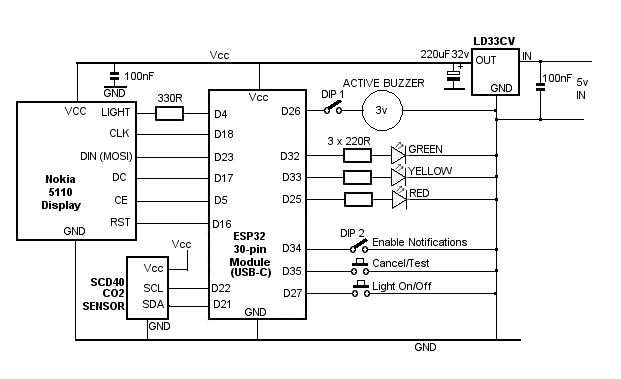
The circuit is fairly straightforward using an ESP32 30-pin development module. The Nokia 5110 display uses the hardware SPI interface and the SCD40 CO2 sensor uses the I2C interface. Virtually every usable IO pin on the ESP32 board is used.
The ESP32 module, the Nokia 5110 display and the SCD40 sensor are all supplied with 3.3 volts. The 3v3 supply from the ESP32 module isn't quite capable of supplying enough power so I used an LD33CV Low drop-out voltage regulator with a 5 volt supply.
The active buzzer takes 23mA so is just within the ESP32's output pins capability for a short duration. The buzzer is wired through a DIP switch - DIP1 in the circuit diagram - mounted on the rear panel to allow the buzzer to be disabled if it's not required.
A second DIP switch - DIP2 connected to ESP32 input D34, enables/disables the PushSafer notifications.
The push button connected to ESP32 input D35 is used to cancel the buzzer. If the buzzer is not sounding, the button acts as a Test and briefly sounds the buzzer (if DIP1 is closed) and sends a notification request to PushSafer if notifications are enabled (DIP2).
The input on D27 toggles the LCD backlight on or off.
Printed Circuit Board
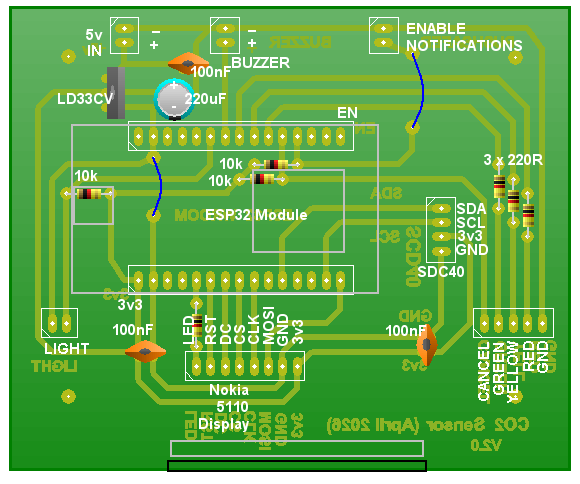
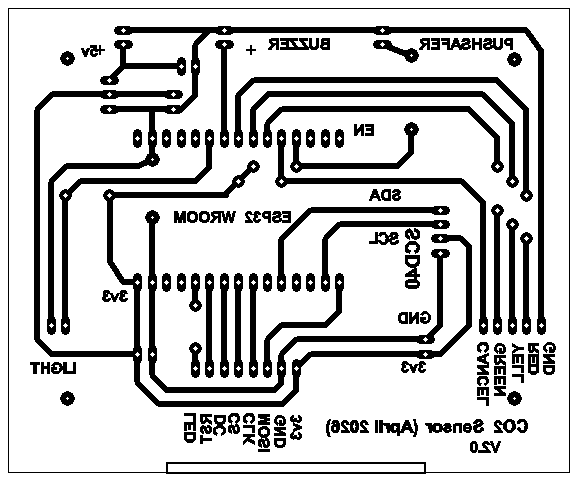
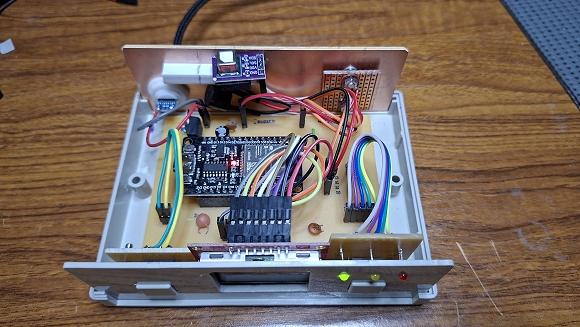
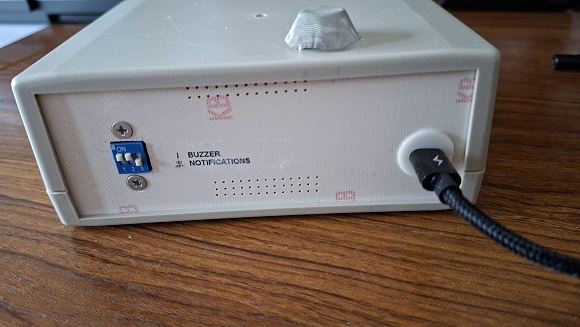
Download Actual size PCB Artwork in PDF format.
Download PCB Wizard design files. (PCB Wizard)
Setting up the Arduino IDE
If you haven't used the ESP32 in the Arduino environment before, it's necessary to install the ESP32 Board definitions into the Arduino IDE.In the Arduino IDE, select Tools -> Boards Manager.
In the Search text box, enter: ESP32.
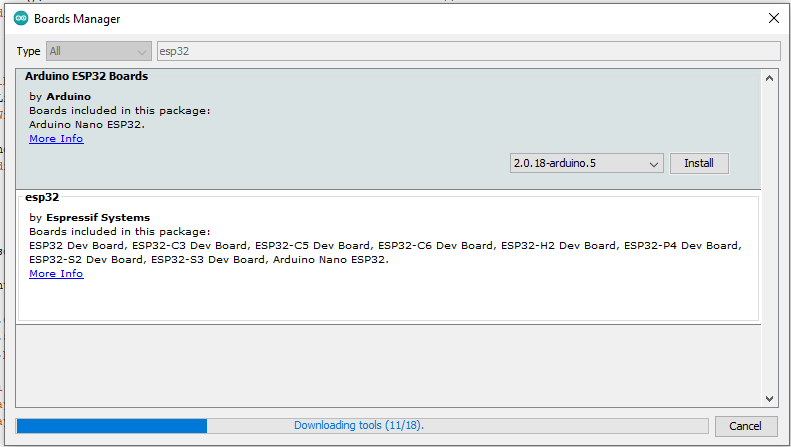
Wait for the platforms index to download then scroll down the list to esp32 by Espressif Systems and click Install.

Close the Arduino IDE.
Copy the CO2 Monitor sketch below and paste it into the IDE.
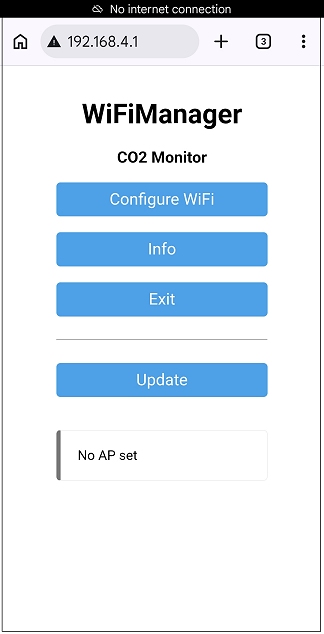
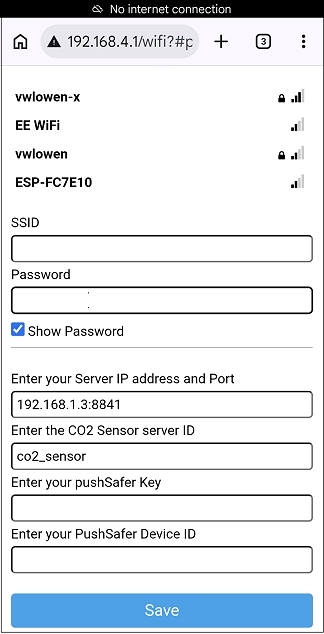
"The WiFiManager library (by tzapu) is a powerful tool for ESP8266 and ESP32 boards in the Arduino IDE that allows setting up WiFi credentials via a web browser without hardcoding them. It creates a captive portal when it cannot connect to a known network, enabling easy, dynamic reconfiguration of network settings."
ESP32 - CO2 Monitor - Arduino Sketch
Additional Arduino Libraries
Sparkfun SCD4x LibraryWiFi Manager Library
Adafruit Graphics Library
Adafruit Nokia 5110 Library
Arduino_JSON Library
Preferences Library
URL Encode Library
/*  ESP32   LOLIN D32 Board*/

/* CO2 Monitor, Plotter and Pushsafer notifier */

#include <WiFi.h>
#include <WiFiManager.h>                                  // https://github.com/tzapu/WiFiManager

#include <HTTPClient.h>
#include <Arduino_JSON.h>                                 // https://github.com/arduino-libraries/Arduino_JSON
#include <UrlEncode.h>


#include <SPI.h>
#include <Adafruit_GFX.h>
#include <Adafruit_PCD8544.h>
#include <Fonts/FreeSansBold12pt7b.h>

#include <Wire.h>

#include <Preferences.h>

Preferences preferences;


#include "SparkFun_SCD4x_Arduino_Library.h" //Click here to get the library:http://librarymanager/All#SparkFun_SCD4x

SCD4x mySensor;


  //mySensor.enableDebugging(); // Uncomment this line to get helpful debug messages on Serial


  // CLK = 18  - Hardware SPI             // Hardware connections to Nokia 5110 LCD display
  // MOSI = 23 - Hardware SPI
  // CS = 5    - Hardware SPI

  // D/C = 17  - Arbitrary selection
  // RST = 16  - Arbitrary selection

  // LED = 4  - Backlight.
  // Vcc - 3v3.
  // GND - GND.


 Adafruit_PCD8544 display = Adafruit_PCD8544(17, 5, 16);  // (D/C, CS, RST)

// Note with hardware SPI MISO and CS pins aren't used but will still be read  MISO = 19.  CS = 5
// and written to during SPI transfer.  Be careful sharing these pins!


String serverIP;          // These values will be entered during the WiFi Manager's "Configure WiFi" routine.
String id;                // The server IP is the LAN address of the computer running the server followed
                          // by a colon (:) and the Port which must be set up in the WiFi roouter's Port-Forwarding.

char serverIPDefault[] = "192.168.1.3:8841";    // This is the default server IP and port I used. Yours will be different.
                                                // Setting a default saves having to re-enter the details in the WiFi Manager
                                                // if the loss of the Network was only temporary and you will be re-connecting
                                                // to the same network.

char idDefault[] = "co2_sensor";                // This is the default ID sent from the CO2 sensor to the server so that..
                                                // the server knows which device is sending data.


#define CO2_WARNING 3500                // Sound buzzer id co2 level is above this value.
#define CO2_HIGH 4000                   // Send notification if notification_sent flag is false.

#define PLOT_MAX 30                     // SCD40 sensor provides data every 30 seconds but we only need to send data
                                        // to the server/plotter every 15 minutes, so count 30 sensor readings before sending
int plotCounter = 30;                   // data to the server.


#define WEB_PORTAL_TIMEOUT 300          // The WiFi Manager's configuration screen will time out after 5 minutes.


int rssi;

bool notification_sent = false;         // Flag to indicate a PushSafer notification has been sent to disable repeats.


int reset_notification = 1000;          // reset 'already sent' notification to allow next alarm.

int numLeft = -1;                       // PushSafer tells how many left before account needs renewing and briefly displays
                                        // on Nokia 5110 screen.

bool alarm_sounding = false;
bool alarm_cancelled = false;

String pushSaferURL = "http://www.pushsafer.com/api";     // PushSafer server URL.

String pushSaferKey;                                      // PushSafer Key and DeviceID are obtained when you set up..
String deviceID;                                          // your PushSafer Account.

char pushSaferKeyDefault[] = "                    ";      // You can enter your PushSafer Key and Device ID here to..
char deviceIDDefault[] = "      ";                        // pre-load the WiFi configuration screen.
                                                          // You can over-write WiFi configuration screen with new data..
                                                          // if you change your PushSafer Key or Device ID.

String title = "CO2 Monitor";                             // PushSafer notification Title
String icon = "11";                                       // PushSafter "Leave building" icon. [->

String pushSaferPath;                                     // Full url to PushSafer including paramneters.

bool displayLight = false;


bool shouldSaveConfig = false;                            // WiFimanager Flag for saving data


void saveConfigCallback() {                               // Callback notifying us of the need to save configuration.
  shouldSaveConfig = true;
}


void configModeCallback(WiFiManager *myWiFiManager) {     // (Very) brief instructions shown on Nokia 5110 screen
                                                          // Called when config mode launched.

  display.clearDisplay();

  display.println("Connect phone:");                      // On your phone, search Settings -> Connections ->
  display.println("'CO2 Monitor'");                       // WiFi networks for "CO2 Monitor".  Connect to that
  display.println("Browser type: ");                      // network.
  display.println(WiFi.softAPIP());                       // Opern a web browser and enter the IP address shown.
  display.println("Configure WiFi");                      // Press 'Configure WiFi' then tap on your WiFi router
  display.print("Press 'Save'");                          // in the list, then fill in the text boxes and hit
  display.display();                                      // 'Save'.

}


void setup()   {
  WiFi.mode(WIFI_STA);    //Set Wi-Fi Mode as station

  Serial.begin(115200);

  preferences.begin("CO2 Monitor", false);


  displayLight = preferences.getBool("displayLight", displayLight);            // Retrieve default values from File System

  serverIP = preferences.getString("serverIP", serverIPDefault);               // Server local IP address and Port.
  id = preferences.getString("co2_sensor", idDefault);                         // Data identifier from CO2 sensor to server.

  pushSaferKey = preferences.getString("pushSafer Key", pushSaferKeyDefault);  // PushSafer private key
  deviceID = preferences.getString("device ID", deviceIDDefault);              // PushSafer device iD.


  pinMode(26, OUTPUT);                      // Buzzer
  digitalWrite(26, LOW);

  pinMode(4, OUTPUT);                       // Backlight
  digitalWrite(4,  displayLight);

  pinMode(32, OUTPUT);                      // Green LED
  pinMode(33, OUTPUT);                      // Yellow LED
  pinMode(25, OUTPUT);                      // Red LED

  pinMode(34, INPUT);                       // Enable PushSafer notifications.  | These INPUTS seem to have no
  pinMode(35, INPUT);                       // Cancel Buzzer                    | internal pullup resistors.
  pinMode(27, INPUT);                       // Backlight on/off                 |


  display.begin();
  display.setContrast(60);
  display.setRotation(2);

  display.clearDisplay();


  WiFiManager wm;

//  wm.resetSettings();              // To clear WiFi settings for testing, uncomment this line.
//  preferences.clear();             // Clears saved preferences for testing.


// Set config save notify callback
  wm.setSaveConfigCallback(saveConfigCallback);

  // Set callback that gets called when connecting to previous WiFi fails, and enters Access Point mode
  wm.setAPCallback(configModeCallback);

  wm.setConfigPortalTimeout(WEB_PORTAL_TIMEOUT);        // 5 minutes

// Configure web portal with custom parameters

  WiFiManagerParameter serverIP_text_box("serverIP", "Enter your Server IP address and Port", serverIPDefault, 20);
  wm.addParameter(&serverIP_text_box);

  WiFiManagerParameter serverID_text_box("serverID", "Enter the CO2 Sensor server ID", idDefault, 10);
  wm.addParameter(&serverID_text_box);

  WiFiManagerParameter pushSaferKey_text_box("pushSaferKey", "Enter your pushSafer Key", pushSaferKeyDefault, 25);
  wm.addParameter(&pushSaferKey_text_box);

  WiFiManagerParameter deviceID_text_box("deviceID", "Enter your PushSafer Device ID", deviceIDDefault, 10);
  wm.addParameter(&deviceID_text_box);

  display.println("Connecting to WiFi");

  display.display();

  bool res;
  res = wm.autoConnect("CO2 Monitor");                     // WiFi Manager attempts to connect to the WiFi network
  if(!res) {                                               // and calls loopback  'configModeCallback()' if it fails.
     Serial.println("Failed to connect");

     digitalWrite(26, HIGH);                               // 'Beep' buzzer to warn of failure to connect to WiFi.
     delay(200);
     digitalWrite(26, LOW);

     display.clearDisplay();
     display.println("No WiFi!");
     display.print("Continuing   without");
     display.display();
     delay(1000);
  }

 // Save the custom parameters to FS
  if (shouldSaveConfig) {
    serverIP = serverIP_text_box.getValue();
    id = serverID_text_box.getValue();

    pushSaferKey = pushSaferKey_text_box.getValue();
    deviceID = deviceID_text_box.getValue();


    preferences.putString("serverIP", serverIP);
    preferences.putString("id", id);

    preferences.putString("pushSafer Key", pushSaferKey);
    preferences.putString("device ID", deviceID);

  }

  rssi = WiFi.RSSI();


  Wire.begin();

  display.println();
  display.println("CO2 Sensor");
  display.print("is starting...");
  display.display();

  if (mySensor.begin() == false) {

    display.println("Sensor not detected. Freezing...");
    display.display();
    while (1);
  }

  //By default, the SCD4x has data ready every five seconds.
  //We can enable low power operation and receive a reading every ~30 seconds

  //But first, we need to stop periodic measurements otherwise startLowPowerPeriodicMeasurement will fail
  if (mySensor.stopPeriodicMeasurement() == true) {
   Serial.println(F("Periodic measurement is disabled!"));
 }

  //Now we can enable low power periodic measurements
  if (mySensor.startLowPowerPeriodicMeasurement() == true) {
    Serial.println(F("Low power mode enabled!"));
  }

  //The SCD4x has data ready every thirty seconds

}


void loop() {
  int co2 = 0;
  int humidity = 0;

  display.setFont();

  display.setCursor(0,0);                                                 // Display an asterisk at th etop left
  if( (digitalRead(34) == LOW) && (WiFi.status() == WL_CONNECTED) ) {     // of the screen if PushSafer notifications
     display.print("*");                                                  // are enabled and WiFi is connected.
  }  else
     display.print(" ");

  display.display();


  if ( (digitalRead(35) == LOW) && (alarm_sounding) ) {                    // Cancel Alarm Buzzer
    alarm_cancelled = true;
    alarm_sounding = false;
    digitalWrite(26, LOW);
    while (digitalRead(35) == LOW);
  }

  if ( (digitalRead(35) == LOW) && (!alarm_sounding) ) {                   // The 'Cancel Alarm' button is also the
    test_alarms();                                                         // 'Test' button if there is no alarm.
    while (digitalRead(35) == LOW);
  }


 if (digitalRead(27) == LOW) {                                             // Display light on/off
    displayLight = !displayLight;
    digitalWrite(4, displayLight);

    preferences.putBool("displayLight", displayLight);                     // Save current state of backlight.
    while (digitalRead(27) == LOW);
  }


  if (mySensor.readMeasurement()) {               // readMeasurement will return true when fresh data is available

    plotCounter++;

    display.clearDisplay();
    display.setCursor(15, 0);
    display.print("CO2 [ppm]");                   // Print the 'header' on the screen

    if (WiFi.status() == WL_CONNECTED) {          // Print an 'i' at top right of screen if WiFi is available.
      display.setCursor(75, 0);
      display.print("i");
    }


    display.setFont(&FreeSansBold12pt7b);         // Set large text.

    co2 = mySensor.getCO2();                      // Get the CO2 reading from the sensor.

    switch(co2) {                                 // Control the Green, Yellow and Red LEDs
     case 0 ... 999:
       digitalWrite(32, HIGH);                    // Green LED
       digitalWrite(33, LOW);                     // Yellow LED
       digitalWrite(25, LOW);                     // Red LED

       digitalRead(35) == LOW;                    // Turn off Alarm buzzer
       alarm_cancelled = false;
       alarm_sounding = false;

       notification_sent = false;                 // Reset notification sent ready for next time
       break;
     case 1000 ... 1499:
       digitalWrite(32, LOW);
       digitalWrite(33, HIGH);
       digitalWrite(25, LOW);

       digitalRead(35) == LOW;                    // Turn off Alarm buzzer
       alarm_cancelled = false;
       alarm_sounding = false;
       break;
     case 1500 ... 2999:
       digitalWrite(32,LOW);
       digitalWrite(33, LOW);
       digitalWrite(25, HIGH);
       break;
     case 3000 ... 15000:
       digitalWrite(32, LOW);
       digitalWrite(33, LOW);
       digitalWrite(25, HIGH);
       if( (!alarm_cancelled) && (co2 > CO2_WARNING) ) {
          digitalWrite(26, HIGH);                          // Turn ON Alarm Buzzer if not cancelled by button.
          alarm_sounding = true;
       }
       break;
     default:
       break;
     }

     (co2 < 1000)?  display.setCursor(23,30) : display.setCursor(15, 30);


    display.print(co2);
    Serial.println(co2);

    display.setFont();                                      // Reset to small font and print 'footer' on screen.
    display.drawLine(0, 38, 80, 38, BLACK);
    display.setCursor(0, 40);
    display.print(mySensor.getTemperature(), 1);
    display.print("c");

    display.setCursor(66, 40);
    humidity = mySensor.getHumidity();
    display.print(humidity, 1);
    display.print("%");

    if (numLeft > -1) {                           // If a PushSafer njotification has been requested, PushSafer
      display.setCursor(32, 40);                  // will respond with the number of notifications that remain
      display.print("(");                         // before the account needs topping up.
      display.print(numLeft);                     // Display at bottom of screen.
      display.print(")");
      numLeft = -1;                 // Only display number of notifications left until next sensor reading.
    }

     display.display();


    // Send data to the server.

    if ((plotCounter >= PLOT_MAX) && (WiFi.status() == WL_CONNECTED)  && (humidity < 100)  )  {

      plotCounter = 0;

      WiFiClient client;
      HTTPClient http;

     rssi = WiFi.RSSI();

    // Specify request destination, including your GET variables - Send values to web server
     String http_request = "";

     http_request = "http://" + serverIP  + "/apage?";
     http_request += "id=" + id;
     http_request += "&leftaxis=" + String(co2);
     http_request += "&rightaxis=" +  String(humidity);

     http_request += "&rssi=" + String(rssi);

     http.begin(client, http_request);

    // Send the request
     int httpCode = http.GET();

    // Check the returning HTTP code
     if (httpCode > 0) {
      // Get a response back from the server
        String payload = http.getString();
      // Print the response
        Serial.println(payload);
     }

    // Close the HTTP connection
      http.end();
    }


    if ((digitalRead(34) == LOW) &&  (co2 > CO2_HIGH)  &&
        (notification_sent == false) && (WiFi.status() == WL_CONNECTED) ) {

      sendNotification("HIGH CO2 LEVEL: " + String(co2) + " (ppm)" );
    }

   }
   else
     Serial.print(F("."));  // Data not available

   delay(1000);

}


void sendNotification(String message) {                     // Send request to PushSafer to push notification to your phone.
   WiFiClient client;
   HTTPClient http;

// Clean up strings for pushSafer http request

   title = urlEncode(title);
   message = urlEncode(message);


   pushSaferPath = pushSaferURL +                          // String to send to PushSafer server.
                       "?d=" + deviceID +
                       "&i=" + icon +
                       "&t=" + title +
                       "&m=" + message +
                       "&k=" + pushSaferKey;

   Serial.println("  ");
   Serial.println(pushSaferPath);                           // Check PushSafer URL on Serial Monitor for debugging.


   Serial.println("Making HTTP request to ...");
   Serial.println(pushSaferPath);

   http.begin(client, pushSaferPath.c_str());

   int httpCode = http.GET();                               // Send the request

     if (httpCode > 0) {                                    // Check the returning HTTP code

       String payload = http.getString();                   // Get the response back from the server

       Serial.println("HTTP Response: ");                   // Print the response on Serial Monitor (for debugging)
       Serial.println(payload);

       JSONVar doc = JSON.parse(payload);                   // Parse the JSON data into JSONVar 'doc'

       int result = doc["status"];                          // Get 'status' from JSON doc. (1 = success)

       notification_sent = (result == 1);                   // Set notification_sent flag if valid response from PushSafer

       if (notification_sent) {                             // Look for number of remaining notifications available

         digitalWrite(4, HIGH);                             // Turn on backlight
         numLeft = doc["available"];

         Serial.print("Available: ");
         Serial.println(numLeft);
      }
   } else {
     notification_sent = false;                             // No response received from PushSafer.
   }

   http.end();                                              // Close the HTTP connection
   delay(1000);
}

void test_alarms() {

    Serial.println("Send test notification");

    digitalWrite(26, HIGH);                // Sound buzzer for half a second (if switch is On).
    delay(500);
    digitalWrite(26, LOW);

    if( (digitalRead(34) == LOW)  && (WiFi.status() == WL_CONNECTED) ){      // if Notifications are enabled...
      sendNotification("Test");
    }
}