The Nestbox Video
There are several websites which give very clear details about setting up a nestbox camera so I'm really just including this page for completeness and to highlight anything which may be different from the normal type of installation.
|
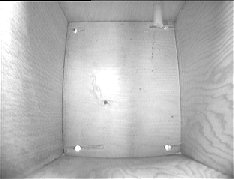
The picture on the left shows the video from a nestbox in the corner of my garden. Unfortunately, it
looks like it's going to be unused this year but, we live in hope for next year. Although that's just a still image, the actual webpage shows live streaming video - although it is difficult to tell the difference! Whether or not to use streaming video or simply capture still images (like the weathercam) is a matter of personal choice - virtually the same setup is used anyway. I deliberately chose a black &white camera because it had built-in infra-red 'lighting' whereas the colour camera did not. |
Composite Video (usually known as AV these days) allows the video signal from the camera to be simply plugged into the standard scart connector of any TV. As I already had a TV/Video Capture Card installed in the PC, it seemed an easy matter to get the video into the PC instead of into the TV.
Never-the-less, it was still quite a long run from the nestbox site and I was also considering the possibility of some form of remote control for the camera. I wasn't sure exactly what sort of remote control but I didn't want't to restrict my options too much by simply running a length of cable from the computer to the camera.
I'd also been considering the purchase of a "Video Sender" unit so I could send the scart signal from the digital satellite receiver downstairs up to the "computer room" which is located upstairs. Suddenly, the two projects gelled into one. These Video Sender units also had the facility to send the satellite receiver's infra-red remote signal in the opposite direction from the computer room back to the satellite reciever and I began to see some interesting possibilities.
The video signal from the video source and the infra-red remote control signal back to the video source are both carried by radio so a line of sight path isn't required in either direction.

|
The picture gives a rough idea of how I have the video set up. Near the nestbox, the garden shed - which has a mains electricity supply - houses the video sender and a 12 volt DC power supply. The camera is supplied with the 12 volts and returns the composite video to the scart socket on the sender via the relay shown in blue. In the "computer room", the receiver picks up the signal (at 2.4 GHz) and converts it back to composite video. This video feeds the video capture card in the computer. As I had anticipated the possibility of the nestbox camera being unused, I took the opportunity to install a second camera. |
As there is only one radio link, I needed a method to switch between the two cameras. To keep the drawing above clear, I haven't shown the second camera but it works as follows: Anyone viewing the webpage showing the streaming video can send a signal back through the internet to my computer. That signal operates an infra red transmitter (shown in blue at the bottom of the picture). The infra red signal is picked up by the video receiver and sent (by radio) to the garden shed. (Note the terms 'transmitter' and 'receiver' in the picture are a bit confusing but I'm using the terms used on the units themselves).
The unit in the garden shed receives the radio signal on 430 MHz and converts it back to infra red. That infra red signal operates an electrical relay which changes over to receive the composite video signal from the other camera.
Some links
- Complete kits - high quality bird boxes + camera and cables
www.birdcamerabox.co.uk (Wig Wam Wild Cams)
-
Building a nest box camera www.beautifulbritain.co.uk
-
Board cameras and lenses Maplin Electronics.
-
Video senders Maplin Electronics.
- Infra red transmitter & receiver kits Maplin Electronics
© Copyright