The Main Menu
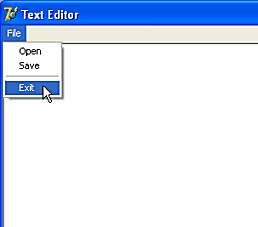
At the moment, the Main Menu of our application doesn't do anything when we click on an item. Let's begin by writing some code for the Exit menu item.
In the days before Windows, programmers used to write code for programs which ran from the top, down. That is, you'd start the program and it would execute each line of code sequentially until it reached the end. It was up to the program (and the programmer) to tell the user when to type at the keyboard or even when to hit just a single key. If the user wasn't ready to type, the program would sit there and wait until the user was ready.
A Windows program doesn't work that way. Once it's finished painting its display on the screen, a Windows program will do nothing much except continue to loop round refreshing the display. It isn't waiting for a key to be pressed or a button to be clicked. It is up to the user to initiate what happens next and in what order things should happen.
Events
This is called Event-Driven programming and all modern programming works in this way. A simple event for our Text Editor program would be a user clicking Exit from the Menu. Let's see how we write the code for this event.

We can select the mnuExit item by clicking it in the Object TreeView or in the DropDown List at the top of the Object Inspector. Once mnuExit is displayed in the Object Inspector, click the Events Tab. The list at the left of the Object Inspector shows all the possible Events that mnuExit can respond to. The OnClick event is the one that occurs when a user clicks the Exit menu item so this is the one we are interested in.
Note that the box to the right of the OnClick event is empty. That's because we haven't yet written any code to respond to the event. Double-click in the empty box and Delphi will take you to the Code Window...
var
  Form1: TForm1;

implementation

{$R *.dfm}

procedure TForm1.mnuExitClick(Sender: TObject);
begin
|
end;

end.
Delphi has automatically created the skeleton of a procedure to respond to mnuExit's OnClick event. It has even placed the cursor at the point where we need to start typing.
As this is the menu's Exit item, we need to write the code which will close the Form.
procedure TForm1.mnuExitClick(Sender: TObject);
begin
   Close;
end;
Don't believe it can be that simple? Try it and see!
Now that we've seen how the OnClick event works for the Exit Menu item, we can move on and write the code for the OnClick events for the Open and Save items.