Dialogs
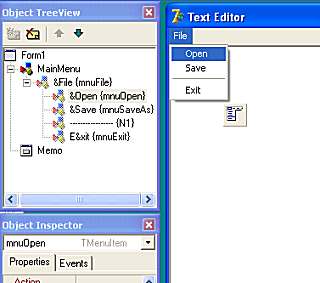
Display mnuOpen in the Object Inspector by clicking on it in the Object TreeView or by selecting it in the Object Inspector's DropDown List. As with mnuExit select the Events Tab and double-click the empty box alongside the OnClick event in order to create the skeleton procedure:
procedure TForm1.mnuOpenClick(Sender: TObject);
begin
 |
end;
So, what code do we write here? Well, what we want is for the familiar 'Open Dialog' box to appear so we can navigate to a file and select it.

Scan along the Tabs on the Component Palette to Dialogs, select the Open Dialog (circled in the picture above) and drop one anywhere on the Form. This is another one of those invisible components (like the Main Menu component) so it doesn't matter where it goes. In the Object Inspector, change its Name to OpenDialog.
Back in the Code Window, add the following code:
procedure TForm1.mnuOpenClick(Sender: TObject);
begin
  if OpenDialog.Execute then
     Memo.Lines.LoadFromFile(OpenDialog.FileName);
end;
Run the program and you'll find the Open Menu item now brings up a dialog box for us to select a file. One slight problem is that the dialog box displays all files. As our Editor only works with text files, we should filter out only the text files.
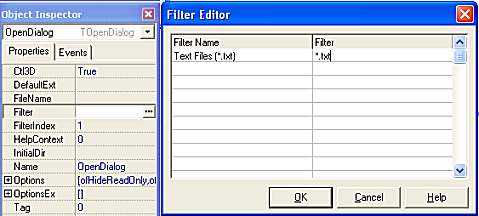
| In the Object Inspector, click the ellipsis (the three dots...) alongside the Filter property to bring up the Filter Editor. Under Filter Name, type 'Text Files (*.txt) and under Filter, type *.txt as shown in the picture on the left, then click 'OK'. If we run our program again, this time only Text files will be listed. |
Saving Files
The SaveDialog component is the little floppy disk symbol next the the OpenDialog component on the Component Palette. Drop a SaveDialog onto the Form and add the following code to the mnuSave OnClick procedure.
procedure TForm1.mnuSaveClick(Sender: TObject);
begin
  if SaveDialog.Execute then
     Memo.Lines.SaveToFile(SaveDialog.FileName);
end;
In the Object Inspector, set the DefaultExt as .txt and use the Filter Editor as with the Open Dialog. And there we have it! A very basic editor. It's barely a usable program but, hopefully, it has given you a start in the years ahead of you enjoying programming in Delphi!
Enjoy and have fun!